
Author: Chirag Singh
Last Updated: 4 October 2026
Title aur thumbnail par to har creator dhyan deta hai, lekin video description aksar upload ke time jaldi-jaldi likh di jati hai. Kabhi sirf “Like, Share and Subscribe” likha hota hai, kabhi keywords ki lambi list, aur kabhi video ke topic ke baare mein clear information hi nahi hoti.
Ek useful YouTube description viewer ko quickly batati hai ki video kis baare mein hai, usme kya seekhne ko milega aur related resources kahan milenge. Isme summary, chapters, useful links, credits aur zaroori disclosures bhi add kiye ja sakte hain.
YouTube ke according, description ki maximum length 5,000 characters hai. YouTube creators ko unique descriptions likhne aur video ko describe karne wale 1–2 main terms ko title aur description mein naturally use karne ki salah deta hai. YouTube Help – Tips for video descriptions
Is guide mein aap seekhenge:
- YouTube description kya hoti hai
- Description mein kya likhna chahiye
- AllIdeaHub Description Generator se first draft kaise banayein
- Generated draft ko publish se pehle kaise edit karein
- Keywords ko naturally kaise use karein
- Chapters aur timestamps kaise add karein
- Links, CTA aur hashtags kaise use karein
- Kaunsi common mistakes avoid karni chahiye
Important: Generated description ko bina padhe copy-paste na karein. Tool first draft aur ideas de sakta hai, lekin final description aapke actual video ke according honi chahiye.
YouTube Description Kya Hoti Hai?
YouTube description woh text hai jo video ke neeche available hota hai. Viewer ko description ki shuru ki kuch lines pehle dikhai deti hain, jabki baaki information dekhne ke liye “Show more” ya equivalent option use karna pad sakta hai.
YouTube bhi recommend karta hai ki description ki shuru ki lines mein video ko clearly describe karein, kyunki viewer ko sabse pehle wahi information dikhti hai. YouTube Help – Tips for video descriptions
Maan lijiye aapka video hai:
“Mobile Se YouTube Thumbnail Kaise Banayein”
To description mein aap bata sakte hain:
- Video mein kaunse steps cover hue hain
- Kaunsa app ya tool use hua hai
- Video kin creators ke liye useful hai
- Chapters ya timestamps kya hain
- Related tutorial ya resource ka link kya hai
Description ka purpose sirf keywords add karna nahi hai. Iska main purpose video ka clear context dena aur viewer ko useful information provide karna hai.
AllIdeaHub Description Generator Kya Karta Hai?
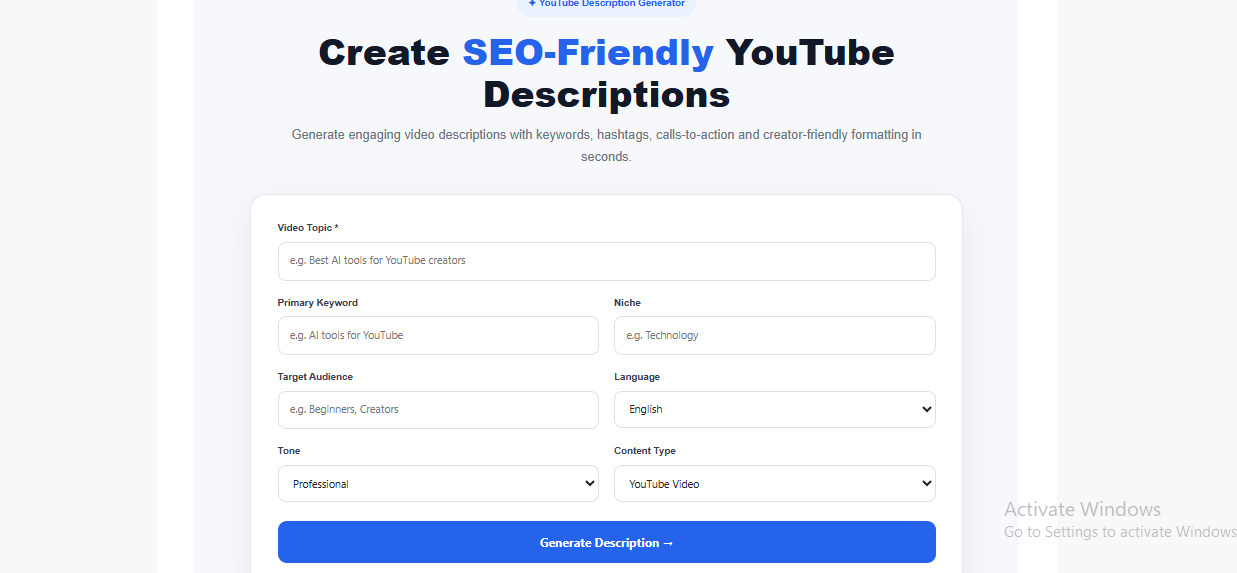
AllIdeaHub Description Generator ek starting point provide karta hai jisse aap YouTube video ke liye description ka structured first draft prepare kar sakte hain.
Aap video se related details jaise:
- Video topic
- Primary keyword
- Niche
- Target audience
- Language
- Tone
- Content type
provide kar sakte hain.
Tool ke workflow mein SEO Description, Short Description, Related Keywords, Recommended Hashtags, Call To Action aur SEO Checklist jaise sections available ho sakte hain.
Tutorial, review, educational video aur Shorts ki requirements alag ho sakti hain. Isliye content type ko actual video ke according select karna important hai.
Note: Tool ke features ya interface future mein change ho sakte hain. Latest features ke liye live Description Generator page check karein.
Description Generator Kaise Use Karein? Step-by-Step
Example video:
“YouTube Keyword Research Beginners Ke Liye”
Step 1: Video Topic Likhein
Topic mein video ka actual angle likhein.
Example:
YouTube keyword research for beginners
Sirf “YouTube” likhne se output bahut general ho sakta hai. Topic jitna specific hoga, first draft ko relevant banana utna easy hoga.
Step 2: Primary Keyword Add Karein
Primary keyword woh main phrase hai jo aapke video ke topic ko describe karta hai.
Example:
YouTube keyword research kaise karein
Keyword ko natural language mein use karein. Agar keyword sentence ko awkward bana raha hai, to sirf keyword fit karne ke liye sentence ko unnatural na banayein.
YouTube bhi 1–2 main terms ko title aur description mein prominently use karne ki recommendation deta hai. YouTube Help – Tips for video descriptions
Step 3: Niche Aur Audience Select Karein
Agar video beginners ke liye hai, to description mein simple wording aur basic steps hone chahiye.
Agar audience advanced creators ki hai, to description mein technical details aur specific terminology useful ho sakti hai.
Example:
Target audience: YouTube beginners
Step 4: Language Select Karein
Apne channel ki actual language select karein.
Aap Hindi, Hinglish ya English choose kar sakte hain, depending on your audience.
Language ka purpose sirf translation nahi hai. Description viewer ki normal communication style ke close honi chahiye.
Step 5: Tone Select Karein
Video ke according tone choose karein.
Tutorial: Educational / Beginner Friendly
Review: Professional / Friendly
Guide: Informative
Shorts: Short and Direct
Agar tool mein “Viral Style” jaisa option available ho, to yaad rakhein ki yeh sirf writing style ko describe karta hai. Isse video ke viral hone ki guarantee nahi milti.
Step 6: Content Type Select Karein
Video ka actual format select karein:
- Tutorial
- Review
- Guide
- Shorts
- Educational
- List
Example:
Agar aap kisi AI tool ka review kar rahe hain, to Review select karna better hai.
Agar aap kisi process ko step-by-step explain kar rahe hain, to Tutorial ya Guide appropriate ho sakta hai.
Step 7: Description Generate Karein
Ab available details ke basis par first draft generate karein.
Lekin yahan kaam khatam nahi hota.
Generated text ko poora read karein aur actual video se compare karein.
Jo information video mein nahi hai, use remove karein.
Jo important information missing hai, use manually add karein.
Generated Description Ko Direct Publish Kyun Nahi Karna Chahiye?
Automated generator aapke actual video ke har detail ko independently verify nahi karta. Isliye generated draft mein aisi information aa sakti hai jo actual video se match na kare.
Example:
Draft:
“Is video mein YouTube keyword research ke 5 powerful tips diye gaye hain jisse aapke views badh jayenge.”
Agar actual video mein sirf 3 tips hain, to “5 tips” incorrect hai.
Aur “views badh jayenge” ek guarantee jaisa claim hai, jise avoid karna chahiye.
Better edited version:
“YouTube keyword research kaise karein? Is beginner guide mein 3 simple steps dikhaye gaye hain: topic ideas identify karna, long-tail keywords dhoondhna aur apne video ke liye primary keyword select karna.”
Is version mein:
- Number actual video ke according hai
- Unnecessary promise remove kiya gaya hai
- Video ke actual points clearly explain kiye gaye hain
YouTube misleading metadata, including misleading titles, thumbnails aur descriptions, ko allow nahi karta.
Publish se pehle:
- Actual video ke main points add karein
- Incorrect claims remove karein
- Accurate timestamps add karein
- Relevant links add karein
- Credits add karein
- Required disclosures add karein
- Language ko apne normal style ke close rakhein
AllIdeaHub Description Generator: Real Example
[Yahan AllIdeaHub Description Generator ka actual screenshot insert karein — generated output clearly visible ho.]
Caption: AllIdeaHub Description Generator se generate kiya gaya initial description draft.
[Iske neeche second screenshot insert karein — same description ka manually edited/final version.]
Caption: Publish se pehle video ke actual content ke according edited description.
इन दोनों screenshots में personal/private information, API keys, email addresses ya confidential data visible na ho.
Description Ki Pehli Lines Kaise Likhein?
Description ki opening lines important hain kyunki viewer ko sabse pehle wahi information milti hai.
YouTube specifically recommend karta hai ki description ki beginning mein video ka clear description diya jaye. YouTube Help – Tips for video descriptions
Weak opening:
Welcome back friends! Aaj ki video mein hum bahut important topic ke baare mein baat karenge.
Isme viewer ko abhi tak pata nahi chala ki video kis topic par hai.
Better opening:
YouTube keyword research kaise karein? Is beginner guide mein primary keywords, long-tail phrases aur question-based keywords ko simple examples ke saath samjhaya gaya hai. Aap apne video ke liye relevant keyword choose karna bhi seekhenge.
Is opening se viewer ko immediately pata chal jata hai:
- Video kis topic par hai
- Kis audience ke liye hai
- Video mein kya seekhne ko milega
Description Mein Keywords Kaise Add Karein?
Keywords useful ho sakte hain, lekin unhe natural sentences ke andar use karein.
YouTube description aur title mein relevant terms ko naturally use karne ki recommendation deta hai. YouTube Help – Tips for video descriptions
Weak example:
YouTube keyword research keywords YouTube SEO keywords keyword research tool keywords best keywords.
Yeh viewer ke liye useful sentence nahi hai aur keyword stuffing jaisa lagta hai.
Better example:
Is video mein YouTube keyword research ka practical method bataya gaya hai. Aap related keywords aur long-tail phrases ko compare karke apne video ke liye relevant primary keyword choose karna seekhenge.
Yahan keyword actual information ke context mein use hua hai.
Description mein repetitive keyword lists ya unrelated descriptive tags add karne se bachein. YouTube repetitive sentences aur over-tagging ko policy issue maan sakta hai. YouTube Help – Hashtags
Chapters / Timestamps Kaise Add Karein?
Long videos mein chapters viewer ko specific sections tak quickly pahunchne mein help karte hain.
Example:
00:00 Introduction
00:35 YouTube keywords kya hote hain
02:10 Primary keyword kaise chunein
04:20 Long-tail keywords
06:15 Common mistakes
08:00 Final checklist
YouTube ke current chapter guidance ke according:
- First timestamp 00:00 se start hona chahiye
- At least 3 timestamps hone chahiye
- Timestamps ascending order mein hone chahiye
- Har chapter ki minimum length 10 seconds honi chahiye YouTube Help – Video Chapters
Sabse important baat: timestamps actual video timing se match hone chahiye.
Agar description mein “Keyword Generator Demo” 04:20 par diya hai, to actual demo bhi us section ke around start hona chahiye.
Links Kaise Add Karein?
Description mein relevant resources ke links add kiye ja sakte hain.
Examples:
- Related YouTube video
- Playlist
- Official tool
- Blog article
- Source page
- Product/resource page
Har important link ke saath short explanation dena helpful hota hai.
Related AllIdeaHub Tools
- YouTube Keyword Generator — Keyword ideas explore karne ke liye
- YouTube SEO Tool — YouTube SEO workflow ke liye
- Title Generator — Video title ideas ke liye
- Thumbnail Ideas Generator — Thumbnail concepts ke liye
Important: Publish karne se pehle har link open karke check karein.
Call To Action (CTA) Kaise Likhein?
CTA ka purpose viewer ko ek relevant next step batana hai.
CTA video ke topic se connected ho to zyada natural lagta hai.
Examples:
“Keyword research par koi question hai? Comment mein pooch sakte hain.”
“Aise hi YouTube tips ke liye channel subscribe karein.”
“Related tutorial dekhne ke liye playlist check karein.”
Har video mein exactly “Like, Share and Subscribe” same order mein likhna zaroori nahi hai.
Video ke context ke according CTA change karein.
Hashtags Kitne Use Karein?
Hashtags sirf relevant topics ke liye use karein.
Example:
#YouTubeTips #VideoSEO #ContentCreation
Keyword research video mein sirf reach ke liye:
#Viral #Trending #MakeMoney
jaise unrelated hashtags add karna useful approach nahi hai.
YouTube ke current hashtag policy ke according, agar kisi video ya playlist mein 60 se zyada hashtags hain, to YouTube un hashtags ko ignore kar sakta hai. YouTube unrelated ya misleading hashtags se bhi bachne ko kehta hai. YouTube Help – Hashtags
Isliye practical approach hai: sirf relevant hashtags use karein.
Tutorial, Review, Educational Aur Shorts Description Mein Kya Difference Hai?
| Video Type | Description Mein Kya Include Karein |
| Tutorial | Main steps, process aur expected outcome |
| Review | Features, actual experience, limitations aur relevant pricing information |
| Educational | Topic summary, important resources aur sources |
| Shorts | Short topic summary, relevant context aur related long-form video |
Tutorial Example
Is tutorial mein aap mobile par YouTube thumbnail ka size set karna, text add karna aur final image export karna seekhenge.
Review Example
Is review mein tool ke main features, usability, limitations aur available pricing options ko check kiya gaya hai.
Pricing ya features frequently change ho sakte hain, isliye review publish karne se pehle current information verify karein.
Affiliate Links Aur Sponsored Content Ka Disclosure
Agar description mein affiliate links hain, to viewer ko clearly batana good practice hai ki link affiliate ho sakta hai aur applicable affiliate program ke terms ke according creator ko commission mil सकता है.
Example:
Affiliate Disclosure: Is description mein kuch affiliate links ho sakte hain. Agar aap kisi affiliate link ke through purchase ya other qualifying action lete hain, to applicable affiliate program ke terms ke according humein commission mil sakta hai.
Agar video mein paid sponsorship, product placement, endorsement ya other branded content hai, to applicable cases mein YouTube Studio ka Paid promotion disclosure bhi use karein.
SEO Optimization Score Ko Kaise Samjhein?
Agar AllIdeaHub Description Generator mein Description Optimization Score jaisa feature available hai, to use ek guidance/estimate ke roop mein dekhein.
Is score ko YouTube ka official ranking score na samjhein.
High score ≠ guaranteed views
Aur:
Low score ≠ bad video
Final description ko accuracy, usefulness, relevance aur readability ke basis par review karein.
Kya Description Generator Views Guarantee Karta Hai?
Nahi.
Koi description generator views, subscribers ya ranking guarantee nahi kar sakta.
Description ka main purpose video ka context clearly explain karna aur relevant information provide karna hai.
Isliye:
Tool = first draft
Creator = final editor
Privacy Ka Dhyan Rakhein
Description generator use karte waqt sirf wahi information enter karein jo description banane ke liye necessary hai.
Private information jaise:
- Passwords
- Phone numbers
- Private customer details
- Confidential client documents
- Unreleased campaign information
- Internal business data
paste karne se bachein.
Example:
Theek:
“Hindi audience ke liye budget smartphone review.”
Avoid:
Private client list ya confidential campaign document ko generator mein paste karna.
Common YouTube Description Mistakes
1. Generated description ko bina check kiye publish karna
Har line ko actual video se match karein.
2. Keywords ki long list add karna
Keywords ko natural sentences mein use karein.
3. Opening mein sirf generic greeting likhna
Pehle video ka topic aur viewer ko milne wali information batayein.
4. Incorrect timestamps
Chapters actual video timing se match hone chahiye.
5. Broken links
Publish se pehle important links test karein.
6. False promises
“100% guaranteed views” ya “subscribe karte hi income guaranteed” jaise claims avoid karein.
7. Sponsored content disclose na karna
Applicable cases mein YouTube Studio ka paid-promotion disclosure use karein.
8. Har video mein exactly same description use karna
YouTube unique descriptions recommend karta hai. YouTube Help – Tips for video descriptions
Yeh Tool Kiske Liye Useful Hai?
Beginners
Jo creators description likhne ka structure samajhna chahte hain.
Regular YouTubers
Jo har video ke liye first draft quickly prepare karna chahte hain.
Teachers
Jo educational tutorials ke liye structured description banana chahte hain.
Freelancers
Jo client videos ke liye description ideas aur basic structure prepare karte hain.
Small Businesses
Jo product demonstrations, tutorials ya informational videos ke liye description draft banana chahte hain.
Lekin har case mein final description ko actual video ke according edit karna chahiye.
Simple Workflow: Generator Se Final Description Tak
- Video ke main points note karein.
- Topic aur primary keyword enter karein.
- First draft generate karein.
- Actual video se information verify karein.
- Opening lines edit karein.
- Chapters aur relevant links add karein.
- Required disclosure add karein.
- Final description ko mobile par check karein.
Is workflow ka purpose generated text ko final answer samajhne ke bajay editing starting point ke roop mein use karna hai.
Publish Se Pehle YouTube Description Checklist
- ☐ Pehli lines mein video ka topic clear hai
- ☐ Description actual video se match karti hai
- ☐ Primary keyword natural way mein use hua hai
- ☐ Unnecessary keyword repetition remove ki gayi hai
- ☐ Description 5,000-character limit ke andar hai
- ☐ Chapters/timestamps accurate hain
- ☐ Chapters 00:00 se start hote hain, agar use kiye gaye hain
- ☐ Links properly open ho rahe hain
- ☐ Affiliate disclosure add hai, agar applicable hai
- ☐ Paid promotion disclosure YouTube Studio mein set hai, agar applicable hai
- ☐ Hashtags relevant hain
- ☐ Generated text manually review kiya gaya hai
- ☐ False views/ranking/earning claims nahi hain
- ☐ Description mobile view mein bhi readable hai
FAQ
Kya AllIdeaHub Description Generator free hai?
Agar tool ke current page par free generation available hai, to beginners first draft ke liye iska use kar sakte hain. Tool ke features aur access conditions change ho sakte hain, isliye latest information ke liye AllIdeaHub Description Generator check karein.
Kya generated description directly publish kar sakte hain?
Publish karne se pehle review aur editing karna better hai. Generated text mein aisi information ho sakti hai jo actual video se match na kare.
Kya description mein keywords daalne chahiye?
Haan, lekin natural context mein. YouTube 1–2 main terms ko title aur description mein prominently use karne ki recommendation deta hai. YouTube Help – Tips for video descriptions
Kya description bahut lambi honi chahiye?
Nahi. YouTube description ki maximum length 5,000 characters hai, lekin maximum length use karna zaroori nahi hai. YouTube Help – Tips for video descriptions
Kya Description Optimization Score YouTube ka ranking score hai?
Nahi. Agar generator koi optimization score show karta hai, to use tool ka internal estimate samjhein, YouTube ka official ranking score nahi.
Kya beginners Description Generator use kar sakte hain?
Haan. Yeh description ka structure aur first draft prepare karne mein helpful ho sakta hai. Final text ko actual video ke according edit karna chahiye.
Kya hashtags zaroori hain?
Hashtags use kiye ja sakte hain, lekin sirf relevant hashtags add karein. YouTube ke according 60 se zyada hashtags hone par hashtags ignore kiye ja sakte hain. YouTube Help – Hashtags
Final Takeaway
AllIdeaHub Description Generator un creators ke liye useful starting point ho sakta hai jo har video upload karte waqt description blank se start nahi karna chahte.
Tool topic, audience, keyword aur content type ke basis par first draft aur ideas organize karne mein help kar sakta hai. Lekin final description ko creator ko khud review karna chahiye.
Ek good YouTube description mein:
- Video ka topic clearly explain hota hai
- Important keywords natural context mein hote hain
- Relevant chapters aur links diye ja sakte hain
- Viewer ko next step samajh aata hai
- Unnecessary promises aur keyword stuffing nahi hoti
- Sponsored/affiliate relationships ko appropriately disclose kiya jata hai
Short takeaway:
Description Generator first draft ko fast bana sakta hai, lekin final description ko actual video ke according edit karna creator ki responsibility hai.
Sources
- YouTube Help – Tips for video descriptions
- YouTube Help – Video Chapters
- YouTube Help – Hashtags
- AllIdeaHub Description Generator
- AllIdeaHub About Us
- AllIdeaHub Disclaimer
Note: YouTube features, policies aur tool features time ke saath change ho sakte hain. Important decisions ke liye current YouTube Help documentation, YouTube Studio aur actual video data ko priority dein.